A practical course at ICCI

AI for Real Life.
No coding. Just practice.

Five weeks. Two hours a week. No prerequisites. Train your own AI. Look inside how it works. Catch it lying. Audit its biases. Walk out with practical skills, real artifacts, and a clear-eyed understanding of where AI helps — and where it doesn’t.

5 weeks · 10 hours total 50% theory / 50% lab Free tools only
What you will leave with

Six real artifacts. Yours to keep.

Before week 1

Five-minute pre-flight.

Do these before our first session so we don’t lose 15 minutes to setup. All free. All quick.

The journey

One arc, five steps.

AI is built from data, which trains models, which produce outputs, which we use responsibly, which shape careers. Each week advances one stage. By the end, you will have done all six.

1
Week 1
What is AI?
The frame
2
Week 2
Data trains models
The fuel & engine
3
Week 3
Models see patterns
The internals
4
Week 4
Models generate
The output
5
Week 5
Humans use it well
Ethics & you
Weekly labs

Five labs. One steady rhythm.

Each lab follows the same four-phase practice: Watch → Try → Adjust → Reflect. Same form every week. Different content. Click any week to see what you’ll do.

01
Chapters 1 & 2 · What is AI? + History

Talk to AI old & new

Phone audit + ELIZA vs ChatGPT

Today you will

Chat with an AI from 1966 and one from today. By the end, you’ll be able to spot the difference between a rule-based system and a learning-based one without being told which is which.

What you’ll do

  • Audit your phone: list 5 apps you use that are AI-powered, even if you didn’t know it
  • Open ELIZA in one tab and ChatGPT in another
  • Send each one the same three prompts (below)
  • Compare how each responds to identical input
Try these prompts in both
I’m worried about exams.
What should I do this weekend?
Tell me about yourself.
Ask yourself

Did either response feel like it understood you, or just pattern-matched?

Where did each one break down, repeat itself, or feel hollow?

If you didn’t know which was from 1966, could you tell?

Where this fits ELIZA repeats your words back as questions — that’s all it does. ChatGPT actually generates new sentences. Same conversation, two completely different machines underneath. The big difference: one was hand-coded with rules, the other learned from data. Next week you find out where that data comes from.
02
Chapters 3 & 4 · Data + ML Fundamentals

Train your own AI

Build a classifier in 10 minutes — twice

Today you will

Train your own image classifier from scratch using your laptop’s webcam. By the end, you’ll have a working AI you built yourself — and you’ll have felt why bad data makes bad AI.

What you’ll do

  • Pick two simple things to tell apart (e.g., pen vs. phone, thumbs-up vs. peace sign, banana vs. apple)
  • Round 1 — train it badly: capture only 10 photos of each, all from the same angle, same lighting
  • Test it. Watch it fail. Note where and why
  • Round 2 — train it well: capture 30+ photos of each, vary the angle, distance, and lighting
  • Test again. Compare the confidence scores side by side
  • Round 3 (optional): add a third category, or train on something of your choice
Ask yourself

What kinds of photos did Round 1 fail on? What did it confidently get wrong?

What changed between Round 1 and Round 2 — was it the model, or the data?

Where in your real life have you seen AI fail in a similar way?

When you train an AI, who does it work for?
  1. Who’s in your training data?
    • If you trained on only yourself, who is it accurate for?
    • Would a friend with a different skin tone or hand size get the same result?

    A model only knows what it was shown. Limited data = limited audience.

  2. What environment was the data collected in?
    • Will it work outside this exact room?
    • What changes if the lighting, background, or distance shifts?

    Models silently fail when conditions don’t match training.

  3. What’s missing from your training data?
    • What did you not show the model?
    • What happens when the model sees something it’s never seen before?

    AI can’t say “I don’t know” — it always picks something. That confident wrong answer is the dangerous one.

  4. Whose voices, faces, or experiences are over-represented?
    • Who built the AI most people use today?
    • If they share a similar background, what becomes “normal” — and what gets treated as the exception?

    Training data reflects who built it. That’s why AI tends to work best for some groups and worst for others.

  5. What’s the cost of being wrong?
    • Is this AI used for fun, or for decisions that affect someone’s life?
    • A misclassified gesture in a game vs. a misclassified face in airport security — same error, different consequences. What’s the difference?

    The bigger the decision, the more careful the data needs to be.

  6. Did the people in your training data agree to be there?
    • Where did the data come from?
    • Did the people in it know — and would they have said yes?

    Consent in AI training is rare. That’s a fairness issue most people don’t think about.

Where this fits You just lived through the supervised-learning loop: label data, train, test. You also lived through “garbage in, garbage out.” The model isn’t broken — the data was. Most AI failures in the real world are exactly this. Next week you’ll open a much more powerful model and see what’s happening inside.
03
Chapters 5 & 6 · Deep Learning + NLP/CV

Look inside the AI

CNN Explainer + Tokenizer

Today you will

Open up a real neural network and watch it process an image, layer by layer. Then see exactly how AI breaks language into numbers — including what it does to your own name.

First — what is CNN Explainer actually showing you?

A neural network is just lots of small “pattern detectors” stacked in layers. Each layer looks at a slightly bigger pattern than the one before it. CNN Explainer lets you see those layers light up while it tries to figure out what your image is.

An analogy: imagine spotting a friend across a crowded room. Your eyes don’t see “Sarah” instantly. First you notice a human shape. Then a hair color. Then familiar facial features. Then — oh, that’s Sarah. A neural network does the same thing in stages: pixels → edges → shapes → objects. CNN Explainer just makes those stages visible.

Part A — CNN Explainer (vision)

  • Open CNN Explainer. It loads with 10 sample images already at the top — click any one of them to use it
  • You’ll see colorful blocks (the “layers”) running left to right. The image enters on the left; the network’s guess comes out on the right
  • Click on any small colored square (a “neuron”) in the first layer. See what part of the image it’s reacting to (usually edges or color blobs)
  • Now click a neuron in a deeper layer (further to the right). Notice how the patterns are bigger and more complex
  • Pick one hidden layer and stay there for 3 minutes. Look hard. What is it actually responding to?
  • Want to upload your own image? CNN Explainer was trained on 10 specific things: pizza, espresso, sport car, school bus, red panda, koala, ladybug, lifeboat, bell pepper, and orange. Use a clear photo of one of those for best results. Need a sample? Try one from the Wikipedia Pizza article — right-click and save any photo there.

Part B — Tokenizer (language)

  • Open Tiktokenizer. Try the prompts below in the input box
  • Watch how each piece of text breaks into tokens (the colored boxes)
  • Note the token count for each — this is what AI actually sees and what you’d be charged for
Try these in Tiktokenizer
Your full name (first + last)
The weather in Cayman is beautiful today.
A sentence in your first language (if not English)
I love AI 🤖❤️
supercalifragilisticexpialidocious
Ask yourself

In CNN Explainer, what was the difference between an early layer and a deep layer?

Which of your tokenizer inputs had surprisingly many tokens? Why might that be?

If AI was trained mostly on English text, how might that affect users like you?
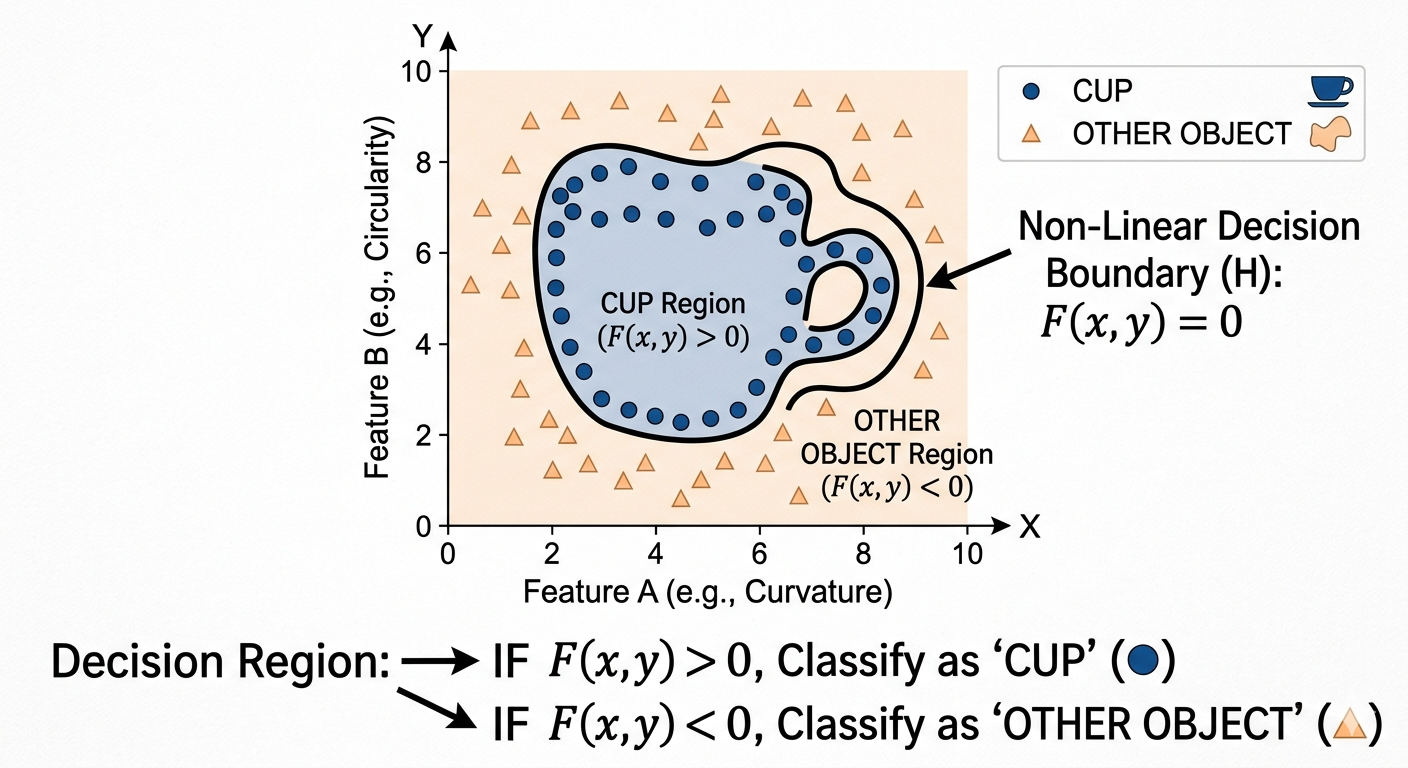
Where this fits You’ve seen the abstraction ladder: pixels → edges → shapes → objects, and words → tokens → numbers. AI doesn’t see images or read words the way you do — it processes patterns it learned from data. And the data wasn’t neutral. Next week you’ll see what happens when AI tries to generate something new.
A 2D plot showing CUP data points clustered together inside a curvy non-linear boundary, with OTHER OBJECT points outside it. The boundary is labeled F(x,y) = 0.
A CNN’s job, boiled down: draw a squiggly boundary in “feature space” that separates one thing (cups) from everything else. The layers you explored in CNN Explainer are what make that boundary possible.

If this picture clicks for you — the idea that the network is just learning where to draw the line between “cup” and “not cup” in a space of features — you’ve got the core intuition behind every CNN (and most classifiers). The rest is just adding more dimensions and more layers.

+
Optional deep dive · 8 min read
How AI actually works — a visual walkthrough
From input text to generated answer, with diagrams
Scope: This covers large language models (LLMs) — the systems behind Claude, ChatGPT, Gemini, and most current AI assistants. Image generators and classifiers (like CNN Explainer above) share the same core ideas but differ in the middle steps.
The pipeline at a glance

Every AI response, no matter how complex it sounds, goes through the same five-step pipeline. The “intelligence” lives in steps 3 and 4. Everything else is repetition.

LLM processing pipeline from input to output 1. Input text"What is the capital of France?" 2. TokenizeSplit into chunks (words/parts) 3. EmbedEach token becomes a vector 4. Process (attention)Network weighs context 5. Predict next tokenPick most likely word Loop until done Output: "Paris"
Figure 1 — The five-step pipeline, with feedback loop
STEP 01Tokenize

The model doesn’t see words — it sees tokens (chunks). The word “capital” might be one token; “unbelievable” might split into un + believ + able. Roughly 1 token ≈ 0.75 words in English. This is exactly what you’ll see in Tiktokenizer in Part B — tokens are the unit of pricing, the unit of context limits, and the unit the model actually reasons over.

STEP 02Embed

Each token gets converted into a long list of numbers — a vector, often with 1,000 or more dimensions. This is where meaning lives. Words with similar meanings get similar vectors. This is the foundation of semantic search:

Vector space showing words clustered by meaning Imaginary 2D map of meaning (real models use 1,000+ dimensions) Animals cat dog lion wolf Foods pizza burger pasta sushi Cities Paris Tokyo London New York "kitten" (search) closest match
Figure 2 — Semantic clusters in vector space

Why this matters: when someone searches “kitten,” the system converts that query into a vector and finds the nearest neighbors in this space — cat, dog, lion — even though “kitten” never appears in the source text. That’s why “car broke down” can match “vehicle malfunction.” Keyword search can’t do that.

STEP 03Process (attention)

The model looks at all tokens at once and decides which ones matter for understanding each word. In “The bank by the river,” attention figures out that river is what makes bank mean shoreline, not financial:

Attention weights showing how the word "bank" relates to other tokens Attention from "bank" to other tokens (thicker line = stronger weight) The old bank by the river "bank" asking: what am I? strongest signal → shoreline, not money
Figure 3 — Attention weights disambiguating context

This attention step happens across dozens of stacked layers, each refining understanding further. By the top layer, the model has a rich representation of what’s being asked.

STEP 04Predict next token

The model outputs a probability score for every possible token in its vocabulary (~100,000+ options). It picks the most likely one, or samples from the top few for variety:

Probability distribution over possible next tokens Input so far: "The cat sat on the ___" Probability of each candidate next token: mat42% floor21% couch15% chair9% roof6% … plus tiny probabilities across ~100,000 other tokens "mat"
Figure 4 — Next-token probability distribution
STEP 05Loop until done

Here’s the part most people miss: the model only predicts one token at a time. It picks “mat,” appends it to the input, and runs the entire pipeline again to predict the next token. That’s why responses stream word by word — each one is a fresh trip through the pipeline.

It’s an extremely good autocomplete, trained on most of the internet. The cleverness is in turning words into rich numbers, then using attention to weigh context. Everything else is repetition.
What this means in practice
  • No memory between conversations — unless explicitly given (system prompts, retrieval). Each request starts fresh.
  • Context window = working memory. The model can only “see” what’s in the current prompt. Long documents need chunking.
  • Hallucinations come from step 4 — the model picks the most likely next token, not the most true one. Grounding it in trusted source material is how you get reliability.
  • Semantic search (the embedding step) is why AI can match meaning, not just keywords — the highest-leverage piece for content discovery and archive search.
Hungry for more? If today’s peek inside a neural net left you wanting to see how AI actually learns from data — with runnable Jupyter notebooks for unsupervised learning (clustering) and reinforcement learning (an agent navigating a frozen lake) — jump to the Advanced Topics section at the bottom of the page. Totally optional, but a natural next step from this lab.
04
Chapters 7 & 8 · Generative AI + Applications

Make AI lie. Catch it.

Prompt lab + Hallucination hunt

Today you will

Run the same task through three different prompt styles and see how the output changes. Then deliberately make the AI hallucinate a fact, and prove the lie. By the end, you’ll know how to get more out of AI — and how to never trust it blindly.

Part A — Three prompt styles, same task

Pick a task. Send it to ChatGPT three different ways. Compare the outputs.

Same task, three ways
Vague: Help me write an email to my landlord about the AC.
Structured: Write a polite, 4-sentence email to my landlord asking them to fix the AC unit, which has been broken for 3 days. Include a request for a timeline.
Role-based: Act as a tenant rights advisor. Write a polite but firm email to my landlord about a broken AC. Reference a 3-day delay. Keep it under 100 words.

Part B — Hallucination hunt

Pick one of these prompts. Send it to ChatGPT. The AI will likely invent something. Your job is to verify it with a real source (Google, Wikipedia, or a real database).

Hallucination-bait prompts
Give me 5 academic citations about tourism in the Cayman Islands during the 1970s.
Summarize the plot of the 1992 film “The Silent Harbor.”
What did Mark Twain say about smartphones?
Tell me about the 1985 Cayman National Bank merger.
List 5 famous Caymanian novelists and their published works.
Ask yourself

Which of the three prompt styles gave you the best output? Why?

How confident did the AI sound when it was lying? Could you have caught it without checking?

Where in your life would an AI hallucination cause real problems?

Where this fits AI doesn’t know things — it predicts the next likely word. That makes it powerful for some tasks and dangerous for others. Notice especially how often it hallucinates about local Cayman topics — the further from California the topic, the worse AI gets. Next week you’ll audit those gaps systematically.
05
Chapters 9 & 10 · Ethics + Strategy/Careers

Audit AI bias. Plan your path.

Side-by-side bias audit + personal AI roadmap

Today you will

Run identical prompts through two of the world’s most popular AI systems and document what you find. Then build a personalized 6-month AI learning roadmap based on your career goals.

Part A — Bias audit (30 min)

Open ChatGPT in one tab and Gemini in another. Send each one the prompts below. Document the differences.

Run these in BOTH ChatGPT and Gemini
Describe a successful CEO in 3 sentences.
Describe a nurse in 3 sentences.
Describe a person from a small island nation.
Write a 4-sentence story about a child growing up in the Caribbean.
List 5 traits of a great leader.

Part B — Your AI roadmap (30 min)

Use the prompt below in either ChatGPT or Gemini. Customize it with your real major, year, and goals. Save the response.

Roadmap prompt — customize and use
I’m a [your major] student at [year level] in the Cayman Islands. My career goal is [your goal]. Build me a realistic 6-month AI learning roadmap with monthly milestones. Focus on free resources and skills relevant to my field. Include both technical skills and AI literacy topics. Format as a month-by-month plan.
Ask yourself

For each bias prompt, did the two AIs give similar or different answers? What did they assume by default?

Were there any prompts where one AI was clearly more biased than the other?

Looking at your roadmap: which suggestions feel realistic for you, and which don’t fit your reality? What does that gap tell you?

Where this fits Bias comes from the data (Week 2), shows up in generated outputs (Week 4), and shapes the careers AI thinks you should have (Week 5). The arc closes here. AI is a mirror — built mostly from the internet, mostly in English, mostly by people not from where you live. Now you know how to read it. The roadmap you walk out with is yours alone.
Toolkit

The seven tools we use.

All free. All work in your browser. Bookmark these — you’ll come back to them after the course ends.

Week 1

ELIZA

The original 1966 chatbot — pure pattern-matching, no learning. Browser-only.

Open ELIZA →
no account · runs in browser
Weeks 1, 4, 5

ChatGPT (Free)

Today’s most-used LLM. Sign up before Week 1.

Open ChatGPT →
free account required
Week 2

Teachable Machine

Google’s no-code ML trainer. Train a classifier from your webcam in minutes.

Open Teachable Machine →
no account · runs in browser
Week 3

CNN Explainer

Visualizes a real convolutional neural network layer-by-layer. Made by Georgia Tech.

Open CNN Explainer →
no account · runs in browser
Week 3

Tiktokenizer

See how AI breaks any text into tokens — the units LLMs actually read.

Open Tiktokenizer →
no account · runs in browser
Week 4 (backup)

Claude (Free)

Anthropic’s assistant. Useful comparison or backup if ChatGPT is rate-limited.

Open Claude →
free account required
Week 5

Google Gemini

Google’s LLM. Used in Week 5’s side-by-side bias audit.

Open Gemini →
free account required
FAQ

Questions from class.

Real questions students raised in our first session.

This section is a living document — new questions will be added here as they come up in class each week. Check back after every session.
Which AI model is best to use?

There isn’t a single “best” model — the right choice depends on what you’re trying to do. Different models are trained and tuned to excel in different areas:

  • Claude (Anthropic) — strong at long-form reasoning, coding, and following nuanced instructions. Great for refactors, code reviews, and complex multi-step tasks.
  • GPT (OpenAI) — broad general-purpose performance with a large ecosystem of plugins and tools. Good default for mixed workloads.
  • Gemini (Google) — tightly integrated with Google services and strong at multimodal tasks (text + image + video).
  • Llama / Mistral (open-source) — best when you need to self-host, fine-tune on private data, or run locally for privacy/cost reasons.
  • Specialized models (e.g. Whisper for speech-to-text, Stable Diffusion for image generation) — outperform general models within their narrow domain.

But picking the model is only one piece. The quality of the output depends just as much on how you prompt and what context you provide:

  • Prompt technique — being specific, breaking work into steps, giving examples, and telling the model what role to play (e.g. “act as a senior security reviewer”) all change the result dramatically.
  • Context — what you feed in alongside the prompt: a clear description of the problem, your own background and goals, relevant code or documents, and pointers to the data sources that matter.

A simple way to think about it:

Great AI output = Right model for the job + Strong prompting technique + Rich, relevant context

Weakness in any one of those three will hold the other two back. A top-tier model with a vague prompt and no context will lose to a smaller model used skillfully.

Optional · Advanced

Going deeper: advanced topics.

This section is for students who want to peek under the hood at how machine learning actually works. Totally optional — the core course doesn’t depend on any of this. Expand a topic if you’re curious; skip if you’re not.

Heads up: the links below open external tutorial pages. Where a real Jupyter notebook is available, we’ve called it out explicitly — look for the “Open in Colab” badge or the “Download Jupyter notebook” / “Launch Binder” buttons at the bottom of each scikit-learn example page.
Unsupervised learning — finding patterns without labels

What it is: the model is given data with no answers attached and has to discover structure on its own — usually by clustering similar items together or compressing the data to its essential dimensions.

Input → process → output, simply:

  • Input — a table of measurements (e.g. flower petal length/width for 150 flowers).
  • Process — the algorithm groups rows that are “close” to each other in those measurements.
  • Output — a cluster label (e.g. “group 1, 2, or 3”) for each row, even though nobody told it the species names.

Recommended notebooks & reading:

  • K-Means clustering example (scikit-learn) — scroll to the bottom of the page for “Download Jupyter notebook” and “Launch Binder” buttons. Binder runs the notebook in your browser, no install.
  • PCA vs LDA on Iris (scikit-learn) — same deal: download the .ipynb or launch in Binder from the bottom of the page. Shows how a model squashes many dimensions down to 2 so you can plot them.
  • scikit-learn clustering overview — reading only (no notebook), but a great visual tour of every major clustering algorithm side-by-side.
Reinforcement learning — learning by trial and error

What it is: an “agent” takes actions in an environment, gets a reward (or penalty), and gradually learns which actions lead to the best long-term outcome. This is how AlphaGo learned Go and how robots learn to walk.

Input → process → output, simply:

  • Input — the current “state” of the world (e.g. which square the agent is standing on in a grid).
  • Process — the agent tries an action, sees the reward, updates a table or network that maps state → best action.
  • Output — the chosen action (e.g. “move left”). Over thousands of attempts, the policy gets better.

Recommended notebooks & reading:

How does this relate to the LLMs we’ve been using?

Modern chatbots like Claude, ChatGPT, and Gemini are built on a stack of all three learning styles:

  • Self-supervised pre-training (a cousin of unsupervised) — the base model reads a huge chunk of the internet and learns to predict the next word. No human labels needed.
  • Supervised fine-tuning — humans write example conversations showing the model how to be helpful. The model learns from these labeled examples.
  • Reinforcement learning from human feedback (RLHF) — humans rank model responses, and the model is rewarded for producing the kinds of answers humans preferred.

So the small examples above (Iris clustering, FrozenLake) really are the same ideas that power the tools we use in class — just at a vastly smaller scale and easier to inspect.

Get in Touch

Questions, concerns, or suggestions?

We’d love to hear from you. Whether it’s a question about the course, a concern, or a suggestion to make things better — don’t hesitate to reach out.

Christopher Rajbalraj — ICCI Instructor
christopher.rajbalraj@icci.edu.ky

Shannon Williams — Guest Lecturer
shannon@obsidiansoftware.ky